import { Navigator } from '@wordpress/components';
Links
 View on Storybook
 View source on GitHub
Examples
Default
const Default = () => <Navigator initialPath="/">(<>
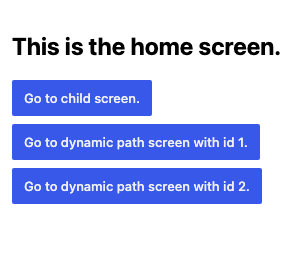
        <Navigator.Screen path="/">
            <h2>This is the home screen.</h2>

            <VStack alignment="left">
                <Navigator.Button variant="primary" path="/child">
                    Go to child screen.
                </Navigator.Button>

                <Navigator.Button variant="primary" path="/product/1">
                    Go to dynamic path screen with id 1.
                </Navigator.Button>

                <Navigator.Button variant="primary" path="/product/2">
                    Go to dynamic path screen with id 2.
                </Navigator.Button>
            </VStack>
        </Navigator.Screen>
        <Navigator.Screen path="/child">
            <h2>This is the child screen.</h2>
            <HStack spacing={ 2 } alignment="left">
                <Navigator.BackButton variant="secondary">
                    Go back
                </Navigator.BackButton>

                <Navigator.Button
                    variant="primary"
                    path="/child/grandchild"
                >
                    Go to grand child screen.
                </Navigator.Button>
            </HStack>
        </Navigator.Screen>
        <Navigator.Screen path="/child/grandchild">
            <h2>This is the grand child screen.</h2>
            <Navigator.BackButton variant="secondary">
                Go back
            </Navigator.BackButton>
        </Navigator.Screen>
        <Navigator.Screen path="/product/:id">
            <DynamicScreen />
        </Navigator.Screen>
    </>)</Navigator>;
With Nested Initial Path
const WithNestedInitialPath = () => <Navigator initialPath="/child/grandchild" />;
Skip Focus
const SkipFocus = () => <Navigator initialPath="/">(<>
        <div
            style={ {
                height: 150,
                outline: '1px solid black',
                outlineOffset: '-1px',
                marginBlockEnd: '1rem',
                display: 'contents',
            } }
        >
            <Navigator.Screen path="/">
                <h2>Home screen</h2>
                <Navigator.Button variant="primary" path="/child">
                    Go to child screen.
                </Navigator.Button>
            </Navigator.Screen>

            <Navigator.Screen path="/child">
                <h2>Child screen</h2>
                <Navigator.BackButton variant="secondary">
                    Go back to home screen
                </Navigator.BackButton>
            </Navigator.Screen>
        </div>
        <NavigatorButtonWithSkipFocus path="/child">
            Go to child screen, but keep focus on this button
        </NavigatorButtonWithSkipFocus>
    </>)</Navigator>;
 View in Figma